Claude setup for the average person
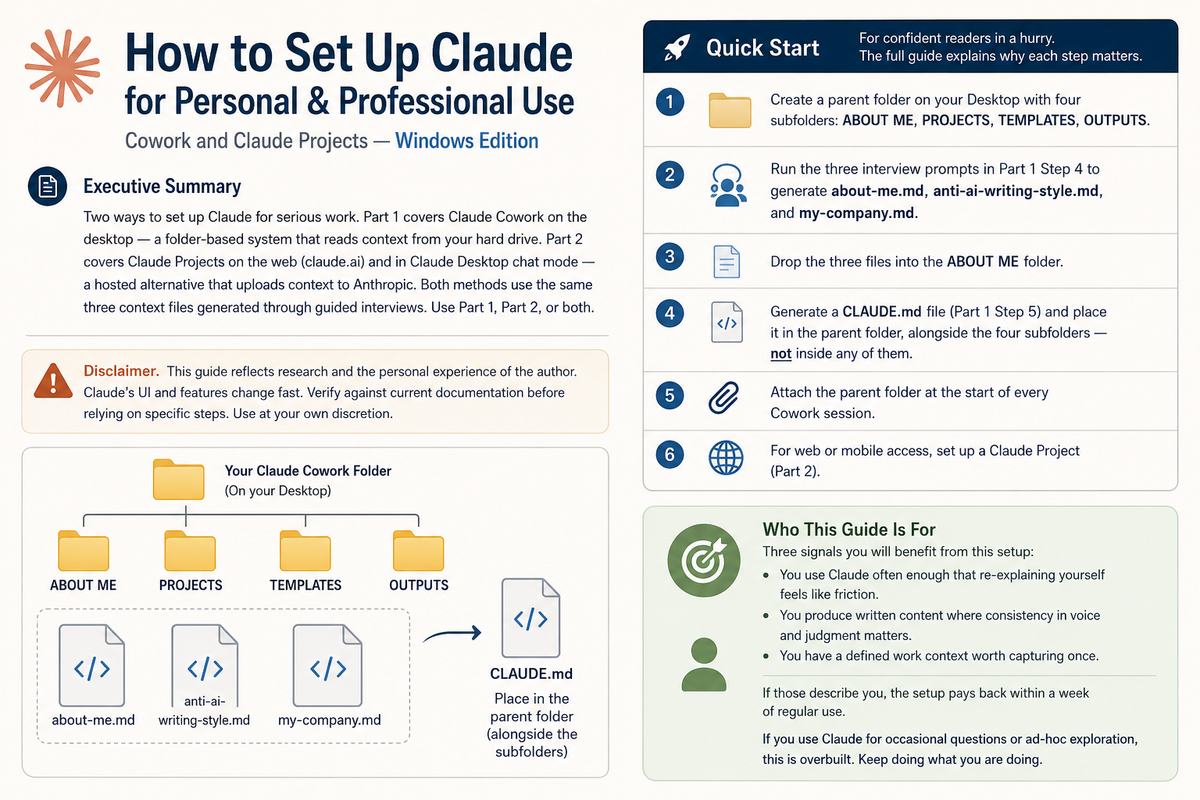
This guide reflects research and the personal experience of the author. Claude’s UI and features change fast. Verify against current documentation before relying on specific steps. Use at your own discretion.
Who This Guide Is For
Three signals indicate this setup will benefit you:
- You use Claude often enough that re-explaining yourself creates friction.
- You produce written content where consistency in voice and judgment matters.
- You have a defined work context worth capturing once.
If those describe you, the setup pays back within a week of regular use. If you use Claude for occasional questions or ad-hoc exploration, this is overbuilt. Continue as you are.
Setup Steps
- Create a parent folder on your Desktop with four subfolders: ABOUT ME, PROJECTS, TEMPLATES, OUTPUTS.
- Run the three interview prompts in Part 1, Step 4 to generate about-me.md, anti-ai-writing-style.md, and my-company.md.
- Place the three files in the ABOUT ME folder.
- Generate a CLAUDE.md file (Part 1, Step 5) and place it in the parent folder, not inside any subfolder.
- Attach the parent folder at the start of every Cowork session.